Star Reel Pro: Wedding
Stage 1: How to get the best video
The "Reel Engine" is a high-performance production tool. To achieve a cinematic final product, quality inputs are essential:
- Orientation: Always film in landscape (horizontal) mode.
- Stability: Use a gimbal or hold your device with two hands to keep footage smooth.
- Lighting: Natural, soft light (such as "Golden Hour") produces the most professional, warm wedding tones.
- Clip Length: Avoid trying to upload single clips exceeding 5 minutes, as they will be rejected.
- Audio & Quality: Ensure your audio is crisp and clean, and that the quality of your video clips is the best you have.
Your video will be 90 seconds of your actual wedding (not counting intros and the outro). Usually, the entire video will be around 1 min 44 seconds.
🎬 How to Pick Your Video Clips
To make sure your favorite moments make it into the final 90-second video, just follow these three simple steps:
- Review the video file you want to use.
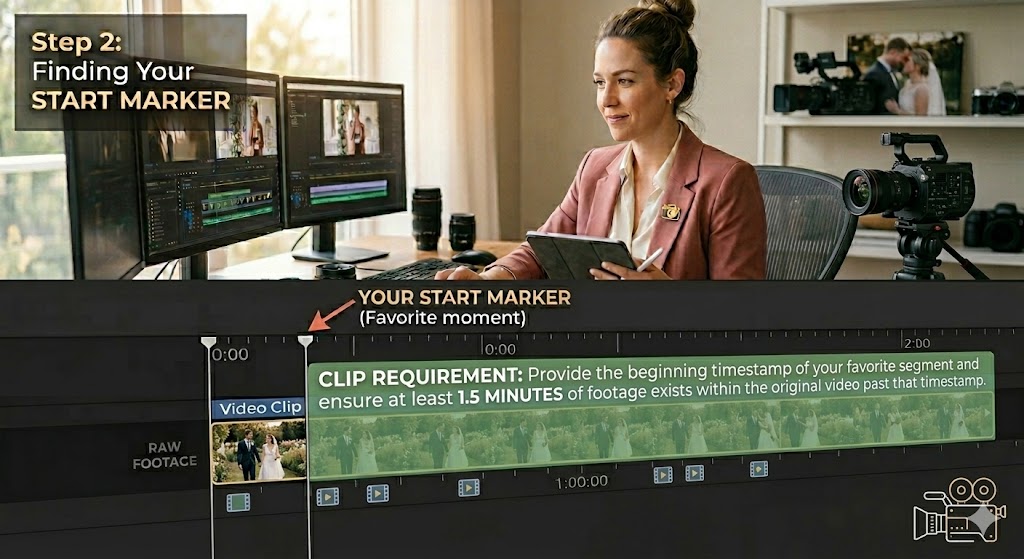
- Find the exact timestamp where your favorite part begins. This is your Start Marker.
- Check the remaining time. Look at the video progress bar and make sure at least 1.5 minutes of footage exists within the original video past that timestamp (just like the requirement shown on the screen in the guide image below).
Stage 2: How to make the video
You can assemble a professional keepsake in minutes by following the production interface:
- Identity Setup: Select "Couple (Wedding Keepsake)" from the focus dropdown. This activates the couples formatting.
- Naming: Use Title Case for the couple (e.g., Sarah & James Cameron).
- Clips: Upload your MP4 files in the order you wish them to appear. (Ensure you followed clip requirements in Stage 1).
- Venue/Event Marker: Use this field to label your clips.
- Preview: Always review the generated "Booking Card" in Step 4.
- Generate: When you are satisfied, press “GENERATE FINAL REEL CARD”.
BOOKING CARD GENERATED will appear. This is a text/data representation of your inputs. - Edit/Submit: Make any changes by selecting the “EDIT INFORMATION” button. When finished press “SUBMIT TO REEL ENGINE”.
Now you will see gold uploading text: UPLOADING "NAME OF VIDEO CLIP".
Wait until all videos are uploaded. Depending on the size, internet connection, and number of clips, this may take 6+ minutes or longer.
When everything has been uploaded, you will see a green SUCCESS ENGINE STARTED message. Now you can close the browser and wait for your email.
Stage 3: How you will get your video
Once you submit your project, the Star Reel Engine takes over:
- Processing: The Star Reel engine will build your video.
- Delivery: Once the "Render" is complete, you will receive an email directly from the Star Reel system.
- Security: The email will contain a secure, time-sensitive download link (valid for 7 days) to your final production.
Stage 4: What to do if you have any video issues or Questions
If your render fails or a clip is rejected, check these common items:
- File Format: Ensure all video files are in .mp4 format.
- Connectivity: If you are uploading a large file, ensure you have a stable internet connection. If the upload hangs, refresh the page and restart the order; the system is designed to handle clean, single-session submissions.
- Support: If you continue to experience technical difficulties or have questions, please contact our support desk at ron [at] ronhaddock [dot] us with your project details and the specific issue encountered.
Pro-Tips for the Planner
- Plan the Narrative: Start with the "Ceremony" clips and end with "Reception/First Dance" clips for the most satisfying emotional arc.
- The Footnote: The Celebrate/Wedding Planner/Business name is displayed as an elegant footnote in the outro. It is designed to be subtle, ensuring the focus remains on the couple while maintaining your professional footprint.